Product
Draftpile: one workspace for the whole creative process
Try the app →
Opens the live prototype. Works best on a laptop or desktop.

Draftpile started as a drag-and-drop editor for long books. It has grown into a workspace for the whole creative process: one place where a novelist, a writers’ room, a theatre company, a game studio or a magazine team can take a project from first idea to finished pages.
Writers draft and restructure, editors suggest changes, directors and designers storyboard and stage each scene, and producers track progress and lay out the final pages, all in the same project, in a loop that keeps going until the work is done. The case study follows how it got there, starting with the problem that began it.
The problem
Long-form writing is mostly rewriting. A book’s structure changes many times before it is finished. A scene from chapter twelve turns out to belong in chapter three, a subplot gets cut, a reveal moves earlier.
Most word processors treat a book as one long scroll of text. Moving a passage means select, cut, scroll for a long time, paste, and hope nothing went missing on the way. Writing tools like Scrivener help by splitting a manuscript into separate documents, but moving smaller pieces, like a paragraph, is still cut and paste.
The question I started with was simple: what would a word processor look like if moving content was as easy as writing it?
Who it is for
The first user was a writer working on something long enough that they can no longer hold the whole structure in their head: novelists, non-fiction authors, screenwriters drafting treatments. As the prototype grew, the circle widened to the people around that writer: editors, showrunners and producers, directors and stage managers, game designers and illustrators. The original problem gave me three jobs to be done:
Move a passage anywhere in the book quickly, including somewhere far from where I am reading.
Restructure at the level of scenes and chapters, not just sentences.
Keep track of what moved, so continuity survives a big rewrite.
Looking at what exists
Before defining anything, I looked at how current tools handle restructuring.
Word processors like Word and Google Docs have an outline or navigation pane, but content still moves by cut and paste.
Scrivener made the binder and corkboard standard for long projects. It is powerful, but it is a desktop app with a steep learning curve, and the smallest thing you can drag is a whole document.
Block editors like Notion made drag-and-drop blocks feel normal, but they are built for notes and wikis, not a 90,000-word manuscript with a fixed hierarchy.
The gap was clear: the feel of a block editor, applied to the structure of a book.
Defining the product
I wrote down one principle before anything else: every piece of the book is a block, and every block can be dragged anywhere. That principle shaped the main decisions.
Nested blocks. The project is made of chapters, scenes and paragraphs. Every level can be dragged, and the rules follow the hierarchy: a paragraph goes into a scene, a scene goes into a chapter.
Drop targets far away. Dragging a paragraph three hundred pages by scrolling is not realistic. So the outline is also a drop target. Drop a paragraph on any scene in the outline and it lands at the end of that scene. A “Move to” command does the same thing by name, for people who prefer the keyboard.

Dragging across the book. A paragraph from chapter one is on its way to “The Diving Bell” in chapter three. The binder row lights up as the drop target, the paragraph fades where it came from, and a label follows the pointer.
A shelf instead of delete. Writers rarely want to delete their words. They want them out of the way. The shelf holds cut paragraphs and whole scenes until they are needed again. Each card remembers where it was first written and where it was last taken from. One click on Put back returns it, and opening a card shows the full text with both places to choose from.
Moved-from labels. When text moves between scenes, it gets a small label saying where it came from. This came straight from the third job. Continuity is the hidden cost of restructuring.
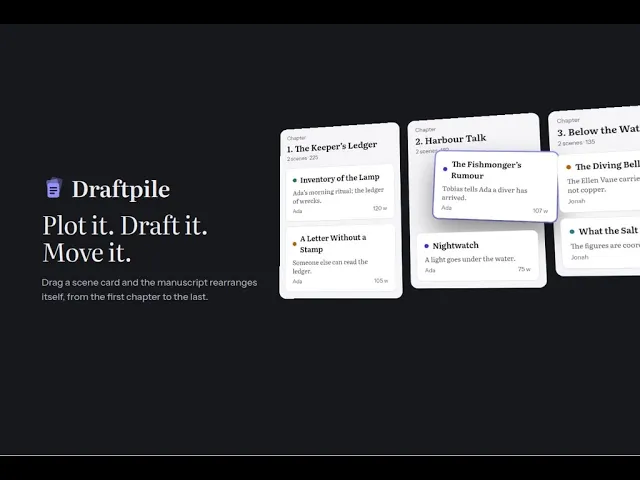
Structure boards. A board of chapter columns and scene cards, for thinking about the plot instead of the prose. Dragging a card moves the scene in the manuscript, and a ghost column adds a new chapter in one click.

The chapter board. Each column is a chapter and each card is a scene, with its point of view and length. Dragging a card here moves the scene in the manuscript.
Production boards. Writing a book is also a production job. A workflow board tracks every scene from idea to outlined, drafting, revising and final, with a sprint goal and a progress bar at the top. Writers can create as many boards as they need and add their own stages.

The production board. The same scenes, tracked by stage from idea to final, under a sprint goal with a progress bar.
Formats that follow industry standards. The app opens by asking what you want to write: a novel, a feature film, a TV episode, a stage play, a non-fiction book, a textbook, a magazine issue, a game design document or a speech. Each format gets its own structure and sample. Screenplays use standard script formatting, with scene headings, character cues, parentheticals and transitions, scene lengths in eighths of a page, and export to Fountain, the plain-text screenplay format. TV episodes print their act breaks, while feature scripts keep acts in the outline only, as spec scripts do. Speeches are timed at about 130 words a minute. Magazines get subheadings, pull quotes and sidebars, and stage plays use stage directions, character names and dialogue. Textbooks and game design documents have block types of their own. A lesson is built from objectives, key terms, worked examples, figures, review questions and answer keys, with a reading-level check against the target grade and a glossary that builds itself. A design spec uses user stories, rules, tuning values, acceptance criteria that can be ticked off, and open questions, with every tuning value gathered into one sheet.

A feature film in standard screenplay format: scene headings, action, character cues, parentheticals and dialogue. Each scene’s length is shown in eighths of a page, the way script breakdowns measure it.
Tracking the work
A long writing project raises the same questions any product does: how far along are we, what is slipping, and what needs attention? So the prototype adds eight ways to see the project beyond the page.
Goals and streaks. A daily word target, a streak counter, a 12-week calendar of writing days, and the pace needed to hit a deadline. Words are counted as you type. On top of that, anyone can set goals of their own and write the formula that tracks them, such as words_today or pct(scenes_final, scenes), from about 25 measures of the project and the team’s writing. A goal can also start as a manual check-in and switch to automatic later.
List view. Every scene in a sortable, filterable table with fields you can edit in place, like point of view, location, story day and owner. For scripts, interior or exterior, location and time of day are read straight from the scene heading, the way a script breakdown works.
Story bible. Characters, places and objects linked automatically to every scene that mentions them, with a continuity warning when someone disappears for several chapters.
Plot threads. A grid of storylines against scenes that shows exactly where a subplot goes quiet.

Plot threads. Each storyline is a row and each scene a column. “Ada and her father” goes quiet for three scenes, and the status column flags the gap.
Spiderweb. A free-form canvas for seeing how the story connects. It can build itself, laying every scene out in story order and drawing each plot thread in its own colour, or start blank for writers who prefer to place the cards themselves. The web and the threads share the same data: recolour a thread and its lines change; draw a connection with a thread selected and both scenes join that thread.
Story map. Big casts are easy to lose track of, so writers can draw the world their story happens in. The map is a grid where you drag out buildings, rooms, hallways, water, grass and woods, draw roads, paths, walls, fences, rivers and railways, and stamp trees, doorways, gates, lamps, benches and signs, naming anything you like. Characters, objects, story threads, scenes and sticky notes are dropped on as nodes, and a timeline with a pip for every scene moves characters and objects through the story.
Reading the map against the text. Wherever the text says someone is, they appear in the matching place on the map on their own; drop them somewhere else and the scene’s record updates to match. Clicking a node shows what it is, the passage it comes from, and a button that jumps to that line in Write. A Table view keeps the older grid of characters against scenes, and in a series every book shares one map. The novel, film, TV and stage play samples each open with a rough demo map.
Storyboard. A storyboard tab for quick sketches, scene by scene. Each frame has a small drawing pad (pen, shade, red pen, line, arrow, a stick-figure stamp and an eraser) plus the fields a storyboard sheet needs: shot size, camera move and length for screen work, cues for the stage, a caption for books. Frames drag to reorder or into another scene, and Play through runs them as a rough animatic. The film, TV, stage play and game samples each open with sketched frames.
Storyboards beside the text. In Write, the frames for the scene you are reading or typing in sit beside the page and change as you scroll. Clicking one opens it for editing, and the panel can be hidden when it isn’t wanted.
A stage plan for plays. In a stage play the Story map becomes a plan of the stage: wings, stage areas, the set, the apron and the house. Actors, props and set pieces sit where each scene puts them, and the set changes as the play moves from scene to scene.
Focus. One button in Write dims and blurs everything except the page, so the app’s many tools stop competing for attention while you write.
Projects and series. One workspace can now hold any number of books and scripts, switched from a project menu. An admin can group them into a series in reading order. From inside any book, writers can read the other books’ characters and lore, plot threads, open notes and where everyone ended up, then bring an entry or a thread into the current book with one click. Series notes hold the canon every book has to respect. The sample opens as book two of a series, with a short prequel alongside it.
Notes. Feedback from editors, readers and collaborators pinned to the scene it’s about, or to the exact phrase it’s about, and ticked off once it’s handled.
Revision colours. For screenplays, the industry’s coloured revision drafts (blue, pink, yellow and so on), with changed lines marked by an asterisk. Scene numbers can be locked, so a new scene added after scene 12 becomes 12A.
Team stats. A live dashboard for the producer or showrunner. It projects the finish date from the team’s pace and compares it with the deadline, then breaks the work down by writer: words a day, active writing time, words per active minute, and who is writing right now. Some teams want that transparency and others don’t, so an admin decides whether writers can see each other’s numbers. When it’s off, each writer sees the team totals and their own. In the prototype the other writers are sample data, and a second browser tab can stand in for a second writer.
Mentions and notifications. Typing @ in a note suggests teammates, and the person mentioned gets it in a Notifications inbox with an unread count, one click from the scene it’s about.
Editors and suggested edits. Editors can’t change the text directly. Instead they highlight a phrase and either suggest a change or leave a comment, the way a Google Docs reviewer would. Suggestions show inline as a strikethrough with the new wording beside it. The writer clicks Accept and Draftpile applies the change straight away, with undo, or rejects it. The Notes view lists every open suggestion with Accept all, and both sides get a notification.
Roles and permissions. Five user types come with the prototype. Writers work on the text and the plan. Storyboarders draw frames in the Storyboard tab and beside the text in Write, where the text is read-only for them. Editors comment and suggest, and work in Press, Goals and Stats. Producers do the same and can also reorder scenes, cards and maps to plan alongside the team, without touching the text or the storyboards. Admins can do everything. In Settings, admins can create their own user types and choose what each one can do in a simple grid of checkboxes: edit text, comment and suggest, plan the structure, see or draw storyboards, Press, and goals and stats. Tabs a type can’t use are hidden, and anything it can only look at is marked View only.
Press: from Final to print-ready pages. Writing and production are different jobs, so they get different spaces. When a section reaches Final, an admin approves it for print and Draftpile copies it into Press, a separate layout space. There, producers and editors work on real pages: a 6 × 9 book with running heads and drop caps, a two-column magazine, a Courier screenplay or a textbook page. They can bold and italicise, change fonts and sizes per paragraph, align and indent, add page breaks and chapter headings, and drag whole sections into a new order. Writers keep drafting in the meantime, and Press flags any approved section the writers have changed since, with a one-click re-import. When the pages look right, Print / PDF produces a proof for review.
What I left out
Scoping mattered as much as the feature list. For the first version I chose:
Plain text while drafting. Bold, italics, fonts and page layout belong to the Press stage, so the writing space stays fast and free of distractions.
Saving in the browser only. No accounts or sync yet, so the team view runs on sample writers and browser tabs.
Print and PDF from Press, but no Word or EPUB export yet.
Each of these is a real gap for someone writing every day. None of them answers the question this prototype exists to answer: does drag-and-drop restructuring actually feel faster?
Building the prototype
I built the prototype with Claude as a build partner, working from the requirements above. That made it possible to go from a problem statement to a working app in one session, and to spend the time on the interaction details that make or break a tool like this.
Dragging works with a mouse, a pen or a finger, and the page scrolls on its own when you drag near the edge.
A drop indicator shows exactly where content will land: a line between paragraphs, or a box when dropping into a scene.
Every move can be undone. A confirmation appears after each move, with a “Go there” link when the destination is off screen.
Pasting a chapter splits it into paragraph blocks automatically.
Both side panels and every scene collapse, so the page can be the only thing on screen. A thin + between scenes adds a new one exactly where it’s needed.
A settings screen gathers the owner’s controls in one place: project targets, team and privacy, appearance, notifications and data.
Every format opens on its own sample: a novel, a heist film about a cello, a newsroom TV pilot, a non-fiction book and a commencement speech. Each is long enough to show real editing, with notes, comments and suggested edits already in place.
Testing
Before calling it done, the main flows went through an automated browser test: dragging a paragraph onto a scene in the outline, moving several paragraphs by name, moving a scene to another chapter, undo, and the phone layout.
The test caught a real bug. Outline rows were picking up spacing meant for the manuscript, which made the outline twice as tall as it should be. A small thing, but exactly the kind of detail that makes a tool feel unfinished.
How I would measure it
If this went to real writers, these are the signals I would watch:
Moves per session, and how many go through the outline instead of scrolling. This shows whether long-distance moves get used.
Undo rate after a move. A high rate means drops are landing in the wrong place.
Shelf items placed back versus discarded.
Retention after the first big restructure. That is the moment a writing tool earns trust or loses it.
What’s next
Splitting long paragraphs across pages in Press, plus images, tables and footnotes.
Saving to files on the writer’s own computer, then optional sync between devices.
Accounts and a shared backend, so team stats and goals come from real writers on their own computers.
Word and EPUB export for sending manuscripts to editors, agents and printers.
Performance at full book length, by only drawing the pages on screen.
Five to ten sessions with working novelists, watching them restructure a real draft.
The prototype opens with a short sample novel, so you can start dragging straight away. Your edits are saved in your own browser.
Changelog
Version 2.3: Access and protection
The prototype now opens behind a short access screen: visitors enter their email, or an access code they were given.
Terms of use, shown on the access screen, set out that the prototype is for evaluation only and may not be copied or reused.
The app is now delivered as a packed build instead of readable source.
A video tour of Draftpile, embedded at the top of this case study and linked from the welcome window.
Version 2.2: Roles and permissions
Two new user types: Storyboarders, who draw in the Storyboard tab or beside the text in Write, and Producers, who plan alongside the team without editing the text or the storyboards.
Permissions in Settings, where admins create custom user types and choose what each one can do with a grid of checkboxes.
Tabs and tools now follow those permissions. Places a user type can only look at are marked View only, and any change made there is put back.
Writers can now open Press by default. Admins can turn that off in Permissions.
A trademark and copyright notice in the welcome window and at the bottom of the app.
Version 2.1: Storyboards, stage plans and focus
A Storyboard tab: quick sketch frames for every scene, with shot, camera, timing, action and dialogue fields, drag to reorder, and a play-through.
Each scene’s storyboard frames appear beside the text in Write and follow along as you scroll, with an option to hide them.
Sample storyboards for the feature film, the TV pilot, the stage play and the game design document.
The stage play’s Story map is now a stage plan of the auditorium, with actors, props and set pieces that change scene by scene.
A Focus button in Write that dims and blurs everything except the page.
The storyboard always sits in the right sidebar, so the page keeps its full width. The shelf below it can be folded into a slim bar and opened again when you need it.
Version 2.0: Quill is now Draftpile
The product has a new name. Quill is already used by many writing and SaaS tools, so the prototype is now Draftpile.
A Draftpile logo, a small pile of pages, now sits at the top left of the app so people always know where they are. Clicking it reopens the welcome window.
A welcome window greets first-time visitors. It explains what the prototype is for, what it can’t do yet (no accounts, no cloud saving, simulated teamwork), and how to get in touch.
A new featured image with the Draftpile name and mark.
Version 1.9.2: Audit fixes
A full functionality audit: every view in all nine sample formats, about 3,400 automated clicks, plus drag-and-drop, editing, undo, the shelf, notes and every link between views.
Notes about a scene that has since been deleted or parked on the shelf now explain where the scene went, instead of doing nothing.
Edits are saved the moment the tab is closed or hidden, so the last few keystrokes are never lost.
Story map: a character dropped into a room now lands in that room rather than the building around it, and place names match the scene heading first.
Version 1.9.1: Map fixes and clean-up
“Show it in Write” and “Open in Write” now stay inside the app. Before, on the live site they scrolled the whole web page the prototype sits in. They now put the cursor in the passage, ready to edit.
A Delete selected button and a × badge on whatever is selected on the map, plus the Delete key.
Clear map…: a warning with three choices. Clear the map for the current scene only, which gives that scene its own blank map. Delete the whole map across the book (and the series, if it is shared). Or cancel.
Version 1.9: Story map
“Who’s where” is now the Story map, a hand-drawn grid map with a Table view for the older character grid.
Drawing tools for areas (buildings, rooms, hallways, water, grass, woods, yards, rock), lines (roads, paths, walls, fences, rivers, railways), single items (trees, doorways, gates, windows, lamps, benches, signs, clocks, boats, cars) and free labels. Every item can be named, moved, resized and erased.
Characters, objects, story threads, scenes and notes can be dragged onto the map. Clicking one shows its details, the passage it comes from, and a link to that line in Write.
A scene timeline moves characters and objects through the story. Characters appear in the place the text puts them; moving one updates the scene’s location record.
Demo maps for the novel series, the feature film, the TV pilot and the stage play.
The generated World map tab has been removed in favour of the Story map.
Version 1.8.1: Map fixes
Object labels now show the full name without a leading “The”.
Area names move to a clear spot when characters or objects would cover them.
Version 1.8: World map
A map of locations generated from scene settings, offstage notes and places mentioned in the text, with drawing tools, labels and a scene timeline.
Version 1.7: Characters, projects and series
Who’s where: a grid of characters against scenes, a snapshot by location, and a line under every scene in Write showing where everyone else is.
Multiple projects, switched from a project menu.
Series: books grouped in reading order, with lore, threads, notes and character positions shared between them. A prequel sample, The Night of the Ellen Vane, joins The Salt Ledger.
Version 1.6: Spiderweb and better formats
Spiderweb: a free-form canvas of scene cards, connected by story order and colour-coded plot threads, kept in sync with the Threads view. It can build itself or start blank.
Textbook and game design document formats rebuilt around their own block types, such as learning objectives, key terms, worked examples, rules, tuning values and acceptance criteria.
Soft separators in the tab bar between writing, analytics and production views.
Shelf cards can be put back where they came from, and open in a reading window showing where they were first written and where they were last taken from.
A clearer shelf icon.
Version 1.5: Press
Admins approve finished sections for print, and Draftpile lays them out as print-ready pages with house styles, page sizes, headers and printing.
Version 1.4: More formats
Textbook, game design document, magazine issue and stage play formats, each with its own sample project.
Version 1.3: Editors
An editor role that suggests changes and leaves comments on exact phrases instead of editing the text directly. Writers accept or reject each suggestion.
Version 1.2: Focus and collaboration
Collapsible binder, shelf and scenes, and quick insert buttons between scenes.
@mentions in notes, a Notifications inbox with an unread count, and a Settings page.
Version 1.1: Team tracking
“Writing as” to switch between team members.
Custom goals driven by formulas, and a live team stats dashboard with a projected finish date.
Version 1.0: The drag-and-drop editor
Chapters, scenes and paragraphs as nested blocks that can be dragged anywhere, including onto scenes in the outline, or sent somewhere by name with Ctrl/⌘ M.
The shelf for parked passages, and moved-from labels on text that changes scenes.
Structure and production boards.
Novel, feature film, TV episode, non-fiction and speech formats in industry layouts.
List view, Story bible, plot threads, notes, goals and streaks, and screenplay revision colours with locked scene numbers.
Try the app →
Opens the live prototype. Works best on a laptop or desktop.